vRealize Suite Lifecycle Manager (vRSLCM) is a one stop shop for lifecycle management (LCM) of your VMware vRealize Suite (vRA, vRB, vROPs, vRLI) . VMware Validate Designs leverages this via Cloud Builder for initial SDDC deployment but it also covers upgrade from a single interface, reducing the need to jump between interfaces by bringing all LCM tasks into a single UI. This doesn’t come without its challenges however, as vRSLCM is now responsible for aggregating all the install/upgrade logs and presenting them in a coherent manner to the user…which isn’t always the case. vRSLCM logs activity in /var/log/vlcm/vrlcm-server.log but at best you get something like this
GET http://localhost:8080/suite/status/1c4a2929-e09c-4a22-b9f1-2834ec1bd65c: 200 null
Which let’s face it isnt very helpful…or is it? At first glance its just a job ID but thanks to @leahy_s in VMware CMBU I can now make this job ID give me more information in a much more structured way, similar to tail -f. Here’s how
- SSH to vRSLCM
- tail -f /var/log/vlcm/vrlcm-server.log
- Look for a line similar to
- Copy the URL to the following command
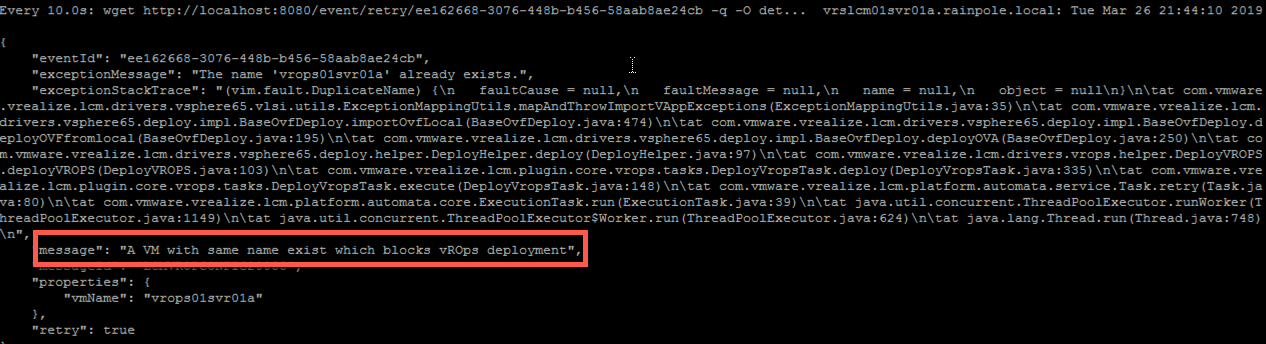
- watch -n 10 “wget http://localhost:8080/event/retry/ee162668-3076-448b-b456-58aab8ae24cb -q -O details && cat details | python -m json.tool”
And now you should have some readable JSON, hopefully with some more info on the error you are hitting


 LifeOfBrianOC
Leave a reply to Cliff Cahill Cancel reply